
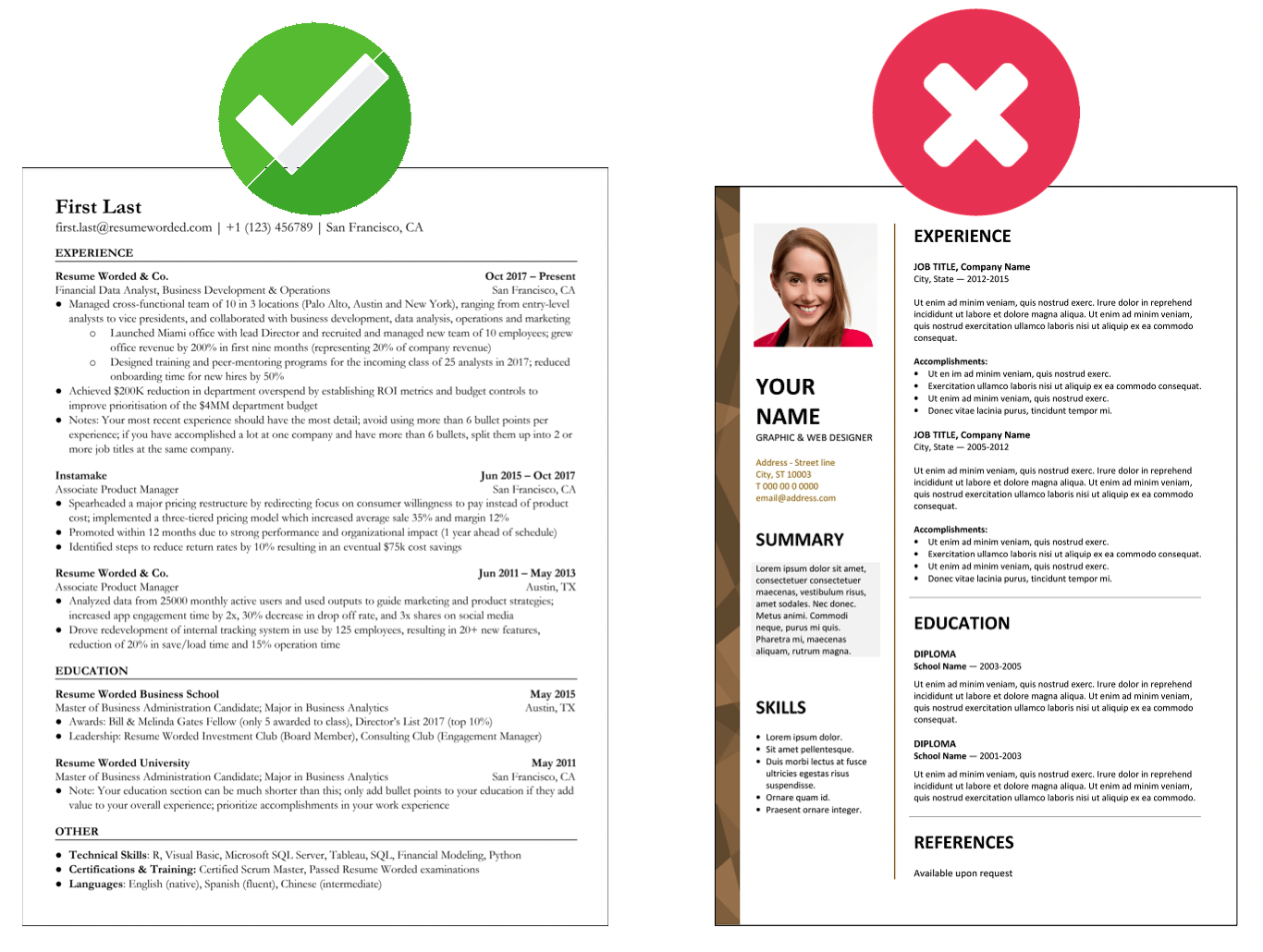

When you apply for jobs at large organizations in Uganda—like major commercial banks, telecom companies, or international NGOs—your CV doesn’t go straight to a human recruiter. It first goes through a digital gatekeeper called an Applicant Tracking System (ATS).
If this software cannot easily read your CV, your application gets lost in a digital “filing cabinet,” even if you are highly qualified. Here is a simple, straightforward guide to making sure your CV passes the digital test and gets into human hands.
What is an ATS and Why Does it Matter?
An ATS is an organizational tool that companies use to collect, sort, and store thousands of applications.
-
How it works: The system scans your CV, extracts your information (history, skills, contact info), and builds a digital profile.
-
The catch: The system automatically ranks and scores your CV based on how closely it matches the job description. Poor formatting or missing words mean you get filtered out automatically.
5 Golden Rules for an ATS-Friendly CV
1. Keep the Layout Simple and Text-Based
Complex designs confuse the scanning software. The cleaner your layout, the more accurate your data will be.
-
Do: Stick to a clean, single-column format. Use standard, safe fonts like Arial, Calibri, Helvetica, or Georgia (size 11 or larger).
-
Avoid: Tables, text boxes, images, graphics, charts, headers, and footers.
2. Use Standard Headings
Do not try to be unique or creative with your section titles. The software searches for specific labels to categorize your information. Stick to standard headings:
-
Professional Summary
-
Work Experience
-
Education
-
Skills
3. Mirror the Job Description Keywords
Recruiters find candidates by searching the software for exact words used in the job advert.
-
Match exact phrases: If a job posting in Kampala asks for “Project Management,” use that exact phrase. Do not change it to “leading teams.”
-
Use terms and acronyms: Write out the full term and include the acronym so the system finds you either way—for example: Search Engine Optimization (SEO).
-
Blend them in: Do not just list keywords in a block; weave them naturally into your bullet points.
4. Prove Your Impact with Numbers
To stand out to both the software and the hiring manager, use hard facts and figures to show your value.
-
Instead of: “Improved company efficiency.”
-
Say: “Reduced operational costs by 15% over 12 months.”
5. Choose the Right File Format
Always follow the specific instructions in the job advert, but generally:
-
PDF: Best for preserving your exact layout so it looks perfect to the human recruiter.
-
Word (.docx): Best for older software systems to parse easily.
When you apply for jobs at large organizations in Uganda—like major commercial banks, telecom companies, or international NGOs—your CV doesn’t go straight to a human recruiter. It first goes through a digital gatekeeper called an Applicant Tracking System (ATS).
Quick Do’s and Don’ts Checklist
| What to Do | What to Avoid |
| Save your file as Firstname_Lastname_CV.pdf | Saving it as just “CV.pdf” or “My_Resume.pdf” |
| Proofread perfectly (ATS cannot recognize misspelled skills) | Using special characters or accents (like résumé) |
| Use standard, simple bullet points (•) | Using fancy shapes, arrows, or icons for bullets |